We run the infra.
You run the business.
Your own Site at company.trivena.tech, with the proxy, application servers, database, backups, updates, and monitoring operated by Trivena.
One platform · AI-first · Managed on Trivena Cloud
No servers. No upgrade projects.
Business software usually arrives with an infrastructure bill attached. Someone has to run the database, apply patches, watch the queues, and own the backups. In most companies that person does not exist.
On Trivena Cloud that work is ours. You get a Site, your team gets logins, and the platform stays current underneath you.
From request to running.
- 01
Request access
Tell us which apps you need and roughly how many people will use them. We set up your account on Trivena Cloud.
- 02
Create your Site
You get an isolated Site on your own subdomain, company.trivena.tech, with the applications you selected already installed.
- 03
Invite your team
Add users, assign roles, and configure permissions per department. Identity is shared across every app in the Site.
- 04
Start working
Import your data or start clean. Trivena keeps the infrastructure current underneath you from that point on.
What we handle for you.
Everything below is part of Trivena Cloud, not an add-on and not your weekend.
Edge proxy & TLS
Requests reach your Site through a managed proxy with certificates issued and renewed automatically.
Application servers
Web and worker processes are sized, restarted, and rolled forward without you scheduling downtime.
Managed database
Your Site's database runs on managed hosts with monitoring, tuning, and maintenance handled by Trivena.
Backups
Regular automated backups of your Site's database and files, so a bad import is recoverable rather than fatal.
Updates & patches
Platform and application updates are applied on Cloud, so you stay on a maintained, current version.
Monitoring & status
Infrastructure is monitored continuously, with public visibility on the Trivena status page.
Background jobs
Queues, schedulers, and long-running jobs are supervised as part of the Site, not something you babysit.
Domains
Start on company.trivena.tech; bring your own domain when you want your team and customers on your brand.
What runs underneath a Site.
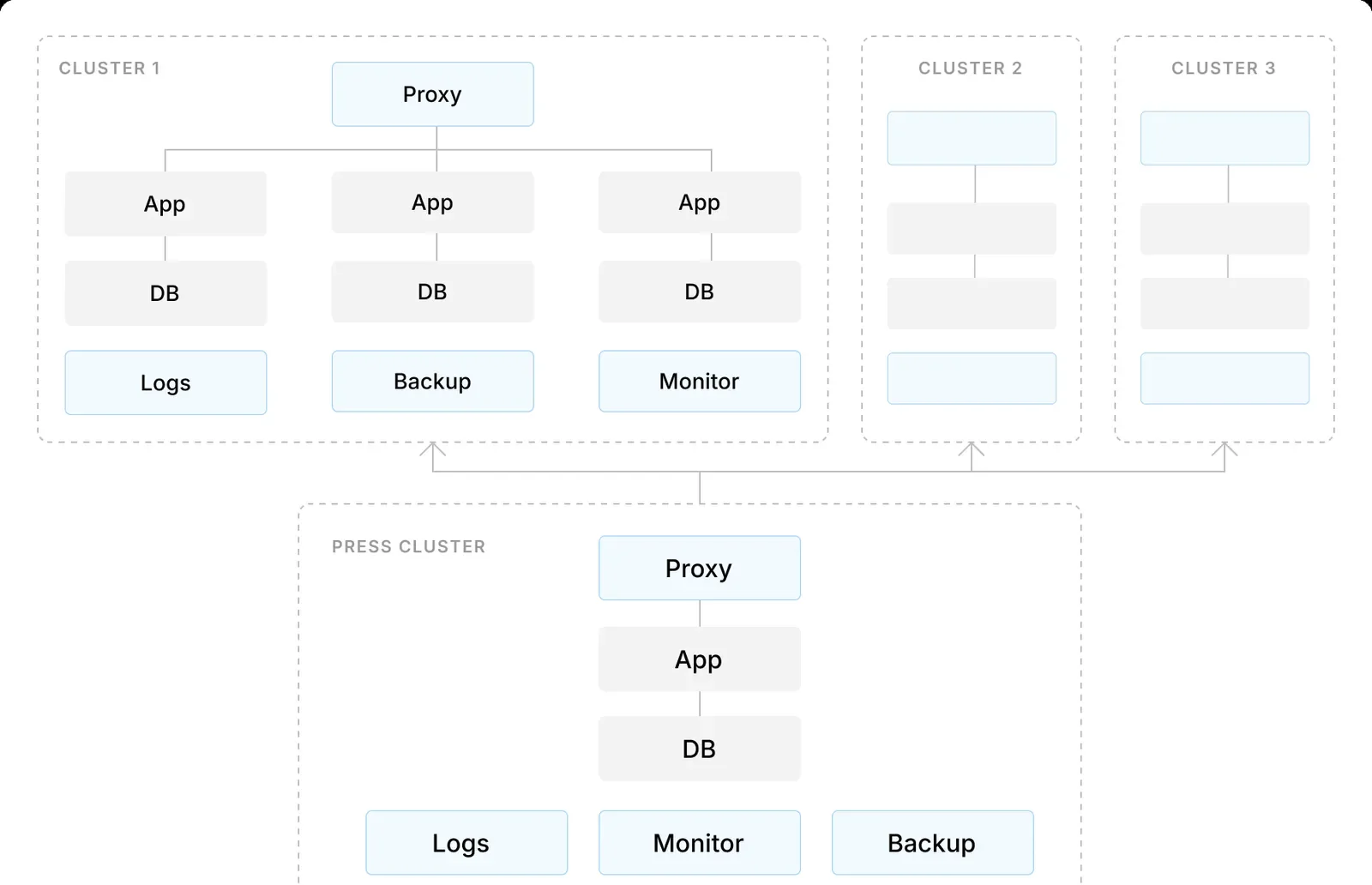
Your Site is served by a cluster of proxy, application, and database nodes, with logs, backups, and monitoring alongside. Trivena operates all of it.
The concepts behind your account.
- Site
- A Site is one isolated tenant: its own subdomain, its own database, its own users and business data. Your Site is the boundary around everything you do in Trivena.
- Apps
- ERP, CRM, HR, and Helpdesk are apps installed into your Site. Adding one later does not mean a migration, because the platform and your users are already there.
- Users & roles
- One identity per person for the whole Site. Roles and permissions decide which apps and which records each person can reach.
- Environments
- Need a place to test a configuration change or a custom app before it touches production? A separate Site gives you a clean sandbox.
Each customer gets an isolated tenant on their own subdomain. You manage users and business data, never infrastructure.
https://acme.trivena.tech
Trivena publishes the health of its control plane, workers, and databases publicly. If something is degraded, you should not have to ask us.
VIEW SYSTEM STATUS →Common questions.
Trivena Cloud is our managed cloud for Trivena applications. You get your own Site, for example acme.trivena.tech, and Trivena runs the proxy, application servers, database, backups, updates, and monitoring.
No. There is nothing to install and no infrastructure to operate. You work in the browser and manage users and business data; the platform underneath is our responsibility.
In your own Site, isolated per tenant, on Trivena Cloud infrastructure. Your Site's data is not shared with or mixed into another customer's Site.
Trivena applies platform and application updates on Cloud Sites. You always run a maintained version without planning maintenance windows yourself.
Yes. Sites start on a trivena.tech subdomain, and you can point your own domain at your Site when you are ready.
Our infrastructure is monitored continuously and reported publicly at status.trivena.tech, using the same monitors we watch internally.
Request access from the contact page or email cloud@tynktech.nl. You can also open Trivena Cloud directly at cloud.trivena.tech if you already have an account.
Get your Site on Trivena Cloud.
Tell us which apps you need and how your team works. We'll set up the right starting point.
Or email cloud@tynktech.nl